Visitor numbers: where customers come from
See how many people visit your website, how many get in touch, where they come from and which pages they read, and tag your links to track campaigns.
The Visitors screen in the owner app shows how your website is doing: how many people came, how many contacted you, where they came from and what they looked at. Owners and staff can open it. It takes 2 minutes to read and helps you decide where to spend your effort, for example Instagram or Google.
Open the Visitors screen
- Open the owner app (https://<your-business>.vadodara.biz/app). You start on Today.
- Tap Visitors: where they come from, top pages →.
- Choose the period at the top: 7 days, 30 days or 90 days.
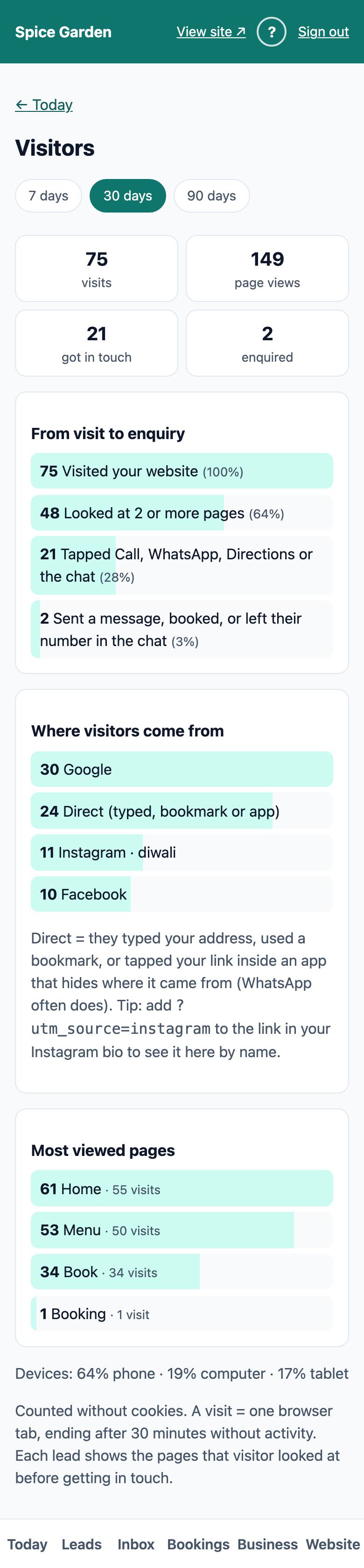
If nobody has visited in that period yet, you see a note suggesting where to share your website link.
The four numbers
| Number | What it counts |
|---|---|
| visits | Visits to your website. One visit is one browser tab, from the first page until 30 minutes without activity |
| page views | Every page opened, so one visit that reads Home and Menu counts 2 |
| got in touch | Visits that tapped Call, WhatsApp, Directions or the chat, or that sent a message or booked |
| enquired | Visits that sent the enquiry form, booked, or left their number in the chat (and so became a lead) |
From visit to enquiry
This funnel shows how many visitors moved on to each next step, with the percentage of all visits:
- Visited your website: all visits (100%).
- Looked at 2 or more pages: they were interested enough to read on.
- Tapped Call, WhatsApp, Directions or the chat.
- Sent a message, booked, or left their number in the chat.
A big drop at step 2 can mean your home page does not show what people are looking for. A big drop at step 3 can mean your phone number or WhatsApp button is hard to find. Calls and WhatsApp chats happen outside the website, so a tap here is the closest the website can count.
Where visitors come from
This list shows how visits started: from Google, Instagram, Facebook, WhatsApp, YouTube, another website, or Direct (typed, bookmark or app).
Direct means the visitor typed your address, used a bookmark, or tapped your link inside an app that hides where it came from. WhatsApp often does this, and so do many other apps, which is why Direct can be large.
Tag your links to see each campaign
To see a source by name, add a tag to the end of the link you share. Then visits from that link appear as, for example, "Instagram · diwali" here and on each lead ("campaign: instagram / diwali").
Your link: https://spice-garden.vadodara.biz (use your own address). Add ?utm_source= and a name, and optionally &utm_campaign= and a campaign name:
| Where you share it | Link to use |
|---|---|
| Instagram bio | https://spice-garden.vadodara.biz/?utm_source=instagram |
| A Diwali post or story | https://spice-garden.vadodara.biz/?utm_source=instagram&utm_campaign=diwali |
| WhatsApp status | https://spice-garden.vadodara.biz/?utm_source=whatsapp&utm_campaign=status |
| Google Business Profile website button | https://spice-garden.vadodara.biz/?utm_source=google&utm_campaign=profile |
| QR code on a poster or menu card | https://spice-garden.vadodara.biz/menu?utm_source=poster&utm_campaign=diwali |
Tip: Use small letters and no spaces in the tags, and always the same spelling ("instagram", not sometimes "Insta"). For a poster, make the QR code from the full tagged link.
Make a QR code for your counter or leaflets
A QR code lets customers open your website by pointing their phone camera at it. The owner app makes one that also tells Visitors where it was placed.
- In the owner app, tap Business → Make a QR code. (Or, on the Visitors screen, tap make a QR code in the tip.)
- Under Opens, pick the page: the Home page, or for example your booking or menu page.
- Under Where it goes, pick Shop counter, Leaflet, Visiting card, Shop window / poster or Printed menu.
- Tap Make the QR code.
- Then either:
- tap Download picture (PNG) to share it on WhatsApp or put it into a leaflet design;
- tap For a print shop (SVG) for a file that stays sharp at any size;
- tap Print to print the card with your business name.
Visitors who scan it are counted under that place in Where visitors come from, for example "leaflet", and a lead they send shows "From leaflet". Make one code per place, so you can see which one works best.
Most viewed pages
The pages visitors opened most, with the number of views and how many different visits saw each page. "Home" is your front page, and pages in other languages show the language, for example "Menu (gu)". Use this to see which pages matter most and keep them up to date.
Devices
The line at the bottom shows how many visits came from a phone, a computer or a tablet. For most local businesses phones are the large majority, so always check your website on a phone after changes.
Privacy
Visitor numbers are counted without cookies and without asking visitors for any personal details. A visit is one browser tab, and it ends after 30 minutes without activity. Every page opened in that tab counts in the same visit, whether the visitor clicked a link, typed the address or went Back. Search engine robots, link previews, uptime checks and automated (headless) browsers are not counted: they leave no page views, so if one of them sends your enquiry form the lead has no pages in its score. The visit details (where they came from and the tags) are cleared after 90 days.
Each page view and tap also records the visitor's IP address, their approximate city, state and country (worked out from the IP address, using IP geolocation by DB-IP) and their browser, system and device. When someone becomes a lead you see these on the lead. The IP address is deleted after 90 days; the city, country and browser stay with the totals. Your website's privacy notice tells visitors this.
Because a visit is one tab, the same person on two phones, or coming back the next day, counts as two visits.